Xây dựng web browser từ đầu theo phong cách course guide.
Một dự án học theo từng bước: tạo desktop browser shell, quản lý tab, chuẩn hóa address bar, cô lập webview, kiểm chứng bằng test/build/audit và ghi tài liệu song ngữ.
Visual Preview
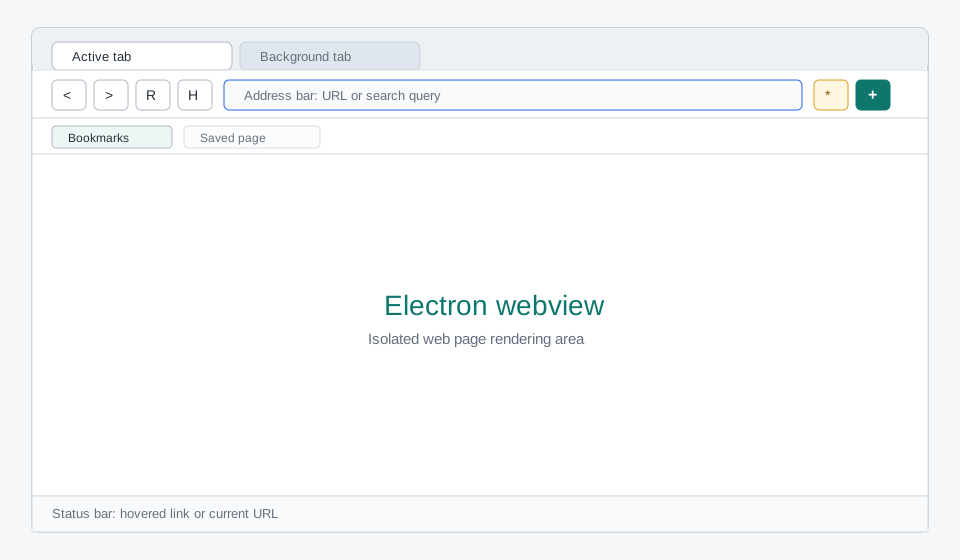
Browser chrome gồm tab strip, address bar, navigation controls, bookmark bar, webview stage và status bar.
The Browser Shell Pattern
Dự án này không viết rendering engine. Chromium render nội dung web, còn code của dự án xây browser shell: UI, navigation, state, webview lifecycle và chính sách an toàn.
THE BROWSER SHELL PATTERN
=========================

User -> Browser Chrome -> Pure State + Webview Controller -> Webview
          |                         |                         |
          |                         |                         v
          |                         |                  Web page process
          v                         v
   Toolbar / tabs             tests can verify
   bookmarks / status         URL and tab behavior

Electron main process governs:
+ Window creation
+ Webview attachment policy
+ Permission denial by default
+ Context isolation and Node isolationTab strip, toolbar, address bar, bookmark bar và status bar.
Biến input thành URL thật hoặc DuckDuckGo search URL.
Quản lý tabs, active tab, loading state, history flags và bookmarks.
Renderer không có Node trực tiếp; webview bị khóa Node integration.
Unit tests, typecheck, production build, audit và smoke launch.
Guide song ngữ, Mermaid source và SVG minh họa để học lại từ đầu.
Runtime Architecture
Quick Start
Chạy toàn bộ dự án trên máy local bằng npm.
npm install
npm test
npm run typecheck
npm run build
npm run devLearning Path
Phase 1: FOUNDATION                    Phase 2: BROWSER LOGIC
====================                   ======================

M01  Project scaffold                  M03  Address normalization
     TypeScript + Vite + Electron           URL vs search query

M02  Electron process model            M04  Tab and bookmark state
     main / preload / renderer              pure functions + tests

         |                                      |
         v                                      v

Phase 3: RUNTIME UI                    Phase 4: SAFETY & DOCS
===================                    ======================

M05  Browser chrome                    M06  Verification and docs
     toolbar + tabs + webviews              test + typecheck + build

         |                                      |
         v                                      v

     Working desktop browser            Bilingual learning guide
Syllabus
| Module | Question | Output |
|---|---|---|
| M01 | Làm sao scaffold desktop browser bằng TypeScript? | package.json, tsconfig, Vite configs |
| M02 | Electron chia main/preload/renderer như thế nào? | src/main/main.ts, src/main/preload.ts |
| M03 | Address bar nên hiểu input ra sao? | src/shared/navigation.ts + tests |
| M04 | Tab và bookmark nên được quản lý ở đâu? | src/renderer/browserState.ts + tests |
| M05 | UI điều khiển webview như thế nào? | src/renderer/renderer.ts, HTML, CSS |
| M06 | Khi nào được coi là xong? | test, typecheck, build, audit, launch |
Browser Engineering Roadmap
Sau khi đối chiếu với browser.engineering và repo browserengineering/book, dự án nên phát triển theo hai nhánh: nâng cấp Electron browser shell hiện tại và thêm mini engine lab riêng để học cách browser hoạt động bên trong.
TRACK A: PRODUCT BROWSER SHELL        TRACK B: MINI ENGINE LAB
==============================        ========================

Session restore                       URL + HTTP lifecycle
History page                          Canvas drawing model
Bookmark manager                      Text layout
Find in page                          HTML tokenizer/tree
Zoom controls                         CSS cascade
Download shelf                        Layout tree
Security indicator                    Paint commands
Error pages                           Accessibility concepts

Goal: app dùng tốt hơn Goal: hiểu engine bên trongPersistent tabs, history reducer, history page và tests.
Thêm workflow browser giá trị cao mà chưa cần đổi rendering model.
Package riêng để học URL fetching, HTML parsing, CSS, layout và painting.
Xem roadmap chi tiết: tiếng Việt hoặc English.
Verification Pipeline
npm test
  -> navigation + browser state behavior

npm run typecheck
  -> TypeScript correctness

npm run build
  -> Electron main/preload bundle
  -> Renderer production bundle

npm audit --omit=dev
  -> Runtime dependency vulnerability check

npm run dev
  -> Smoke test: Electron window opens